
Email proofreading that stays under your control.
Viska Brev proofreads Swedish and English drafts directly in Thunderbird. Use Ollama Server, Ollama Cloud, OpenRouter, or SGLang with your chosen model.
Latest build: 0.5.0 for Thunderbird 128+.
New in 0.5.0: DeepSeek V4.1 Flash 1017 is the recommended Ollama Cloud model; a draft that changed after proofreading asks before anything is replaced; quotes, forwarded mail and phone signatures are recognised in more languages; clearer error messages; and the settings page is in Swedish too.
Clean up the draft, not your voice.
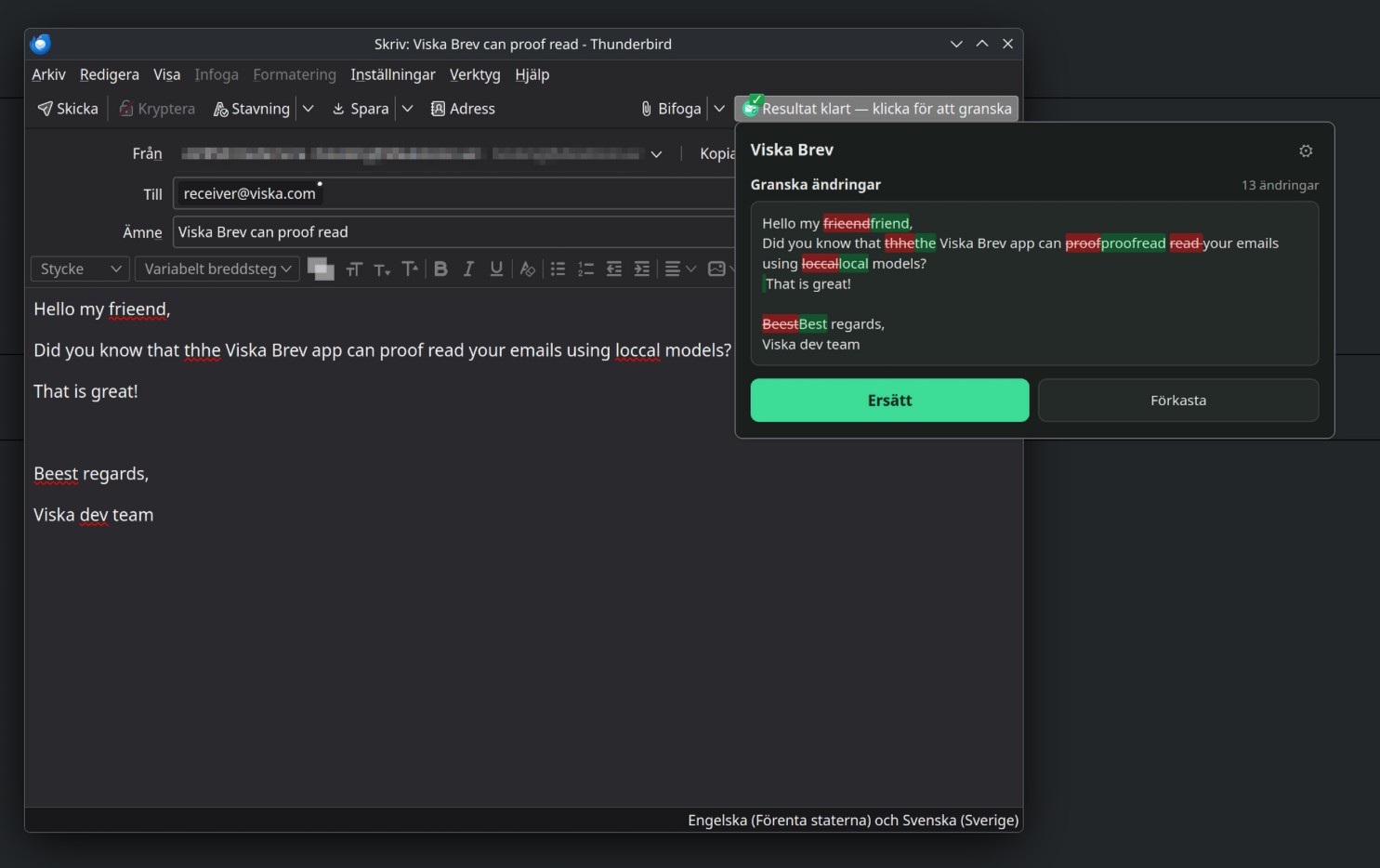
The extension opens a proofreading panel in Thunderbird's compose window. Choose spelling, grammar or expand mode, review the green/red diff, then accept only when the result is right. Quoted mail and signatures are left alone.
Install from the XPI file.
Viska Brev is self-hosted for now. Thunderbird can install unsigned extensions from a local file, so the XPI works without Add-ons store publishing.
- Version
- 0.5.0
- Size
- 57 KB
- Requires
- Thunderbird 128+
- SHA256
551efcdde7b2460a95d65ceaf0858bf429da1a14e9c6d7dfc6e5eb0f3f758b92
Install once, then update in Thunderbird.
The first installation is from the XPI file. Version 0.4.3 and later
then use Viska Brev's secure update feed inside Thunderbird. Verify
the checksum in downloads/SHA256SUMS if needed.
Configure and test Ollama Server, Ollama Cloud, OpenRouter, or SGLang
in the extension's Connections settings.
1. Download viska-brev-latest.xpi
2. Thunderbird -> Tools -> Add-ons and Themes
3. Gear menu -> Install Add-on From File
4. Select the .xpi file

Updates after 0.4.3:
Add-ons and Themes -> Gear menu -> Check for Updates
Keep automatic add-on updates enabled.

Already installed before 0.4.3? Install this XPI over it once.
Do not uninstall: removing it can clear provider settings and prompts.

Local Ollama: allow OLLAMA_ORIGINS=moz-extension://*

Connections:
Choose a provider, model, and optional/required key
Use Test connection before proofreading
Natural Thunderbird paragraph spacing on Linux.
Grammar and Expanded now use semantic Thunderbird paragraphs, so dictated Linux drafts keep natural spacing without empty double rows. Rich links, lists, quotes and signatures stay protected, with a clear localized choice only when plain replacement is needed.
Recent development.
-
Viska Brev 0.4.5
Restores natural Thunderbird paragraph spacing for model-created greetings, body text and closings on Linux.
-
Viska Brev 0.4.4
Turns model paragraph markers into standard Thunderbird paragraphs without adding unintended empty rows.
-
Viska Brev 0.4.3
Adds secure in-place updates and safe paragraph reflow for ordinary Thunderbird email drafts.
-
Viska Brev 0.4.2
Makes connection tests clearer and strengthens email-aware paragraph formatting for dictated drafts.
-
Viska Brev 0.4.1
Fixes settings migration from 0.3.1 while preserving provider, model, prompt and privacy choices.
-
Viska Brev 0.4.0
Adds Ollama Server, Ollama Cloud, OpenRouter and SGLang, with reliable provider streams and safe retries.
-
Viska Brev 0.3.1
Adds support for Ollama servers on the local network, not only localhost.
-
Viska Brev 0.3.0
Introduces Viska Brev, its dedicated landing page and self-hosted Thunderbird download.