Viska turns your voice into finished text wherever your cursor is: email, chat, documents, AI prompts. Transcribed on your own computer, offline and free. The private alternative to Wispr Flow.
For Apple Silicon Macs (0.7.6), Windows 11 (0.7.6) and Linux (0.7.6).
Private by defaultWorks offlineNo account, no subscription
“hi anna um thanks for the meeting yesterday I have sent the the documents to the board and we can go through the budget on tuesday no wednesday”
New message
To: Anna Lind · Subject: Board documents
Hi Anna, thanks for the meeting yesterday. I have sent the documents to the board, and we can go through the budget on Wednesday.
Example. Above: what was said. Below: what Viska typed, with intuitive proofreading.
What Wispr Flow does in the cloud, Viska does on hardware you own.
Private dictation means your speech becomes text on your own devices, not on someone else’s servers. With host mode, your own GPU becomes a private dictation service for your laptop and your Android phone.
Your audio stays with you
By default your audio never leaves your computer. Transcription runs locally with Whisper, offline once a model is downloaded.
Your GPU, for all your devices
Share your own GPU privately with your laptop and Android phone over your Tailscale network, with host mode and Viska Voice. Cloud dictation apps do not offer that, because the transcribing happens in their cloud. How it works
No account, no meter
No account, no word limits and no subscription. Viska is free.
Open, on all three systems
Licensed GPL-3.0-or-later, so anyone can inspect it. Runs on Linux, macOS and Windows.
Cloud only if you choose it
Cloud proofreading is off until you turn it on, and then it sends text, not audio, to providers that state zero data retention: Ollama Cloud or OpenRouter with ZDR switched on. What that means
Viska is a speech-to-text app that works system-wide. It waits in the background, so you never switch windows to dictate, and it types only where you put the cursor.
Put the cursor where the words should go
An email, a chat, a document, a terminal, a prompt box. Any app that takes text.
Double-press a key and speak
A small overlay shows that Viska is listening. Pause, think, carry on; it keeps listening until you stop.
Stop, and the text is there
Whisper transcribes on your computer, proofreads if you want it to, and types the result at the cursor. If an app blocks typing, the text waits on the clipboard and Viska tells you.
Three gestures, the same on every system
Press
Mac
Windows & Linux
Start or stop recording
left ⌘ twice
left Ctrl twice or CtrlAltD
Record with the other proofreading choice
hold ⇧, left ⌘ twice
hold Shift, left Ctrl twice or CtrlAltShiftD
Switch dictation language
right ⌘ twice
right Ctrl twice or CtrlAltShiftL
Double-press gestures need macOS Input Monitoring, an opt-in keyboard hook on Windows, or opt-in input access on Linux. The key combinations work everywhere without it. macOS setup guide
Spoken language in, written language out.
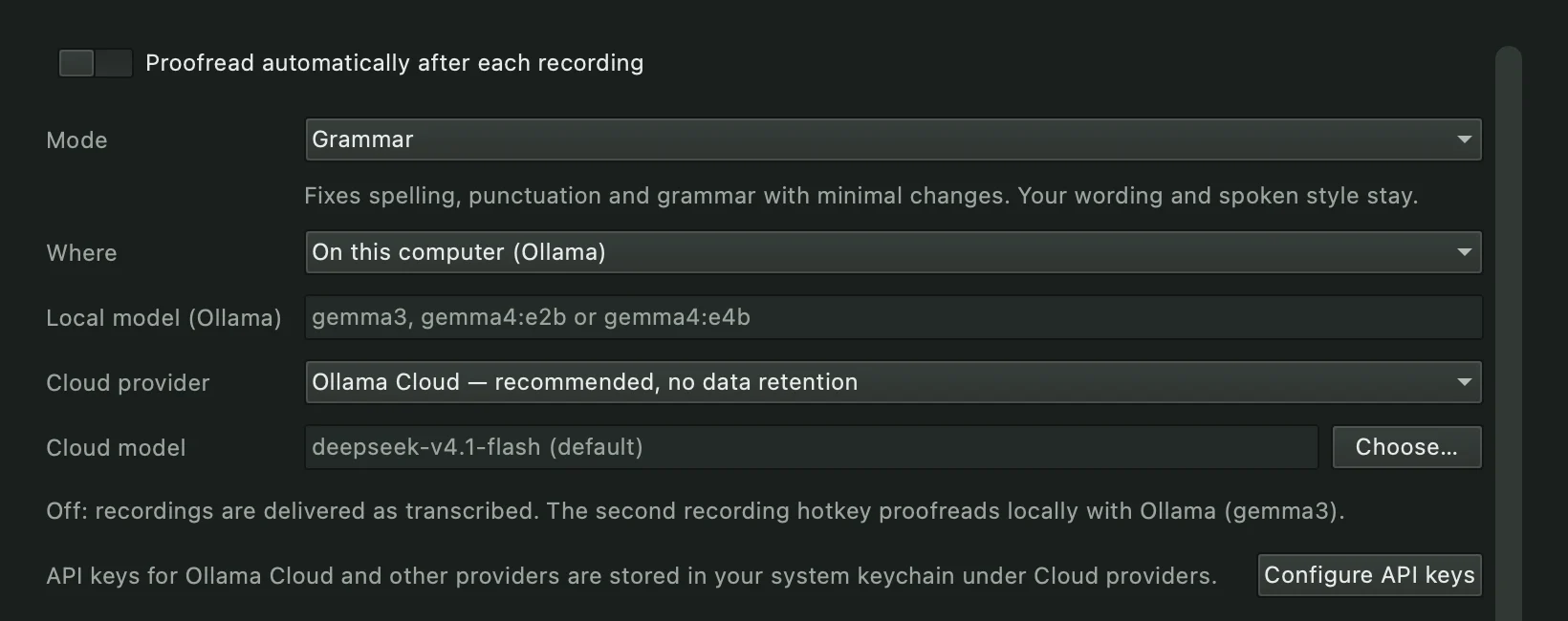
Speech is full of “um”, restarts and second thoughts. Turn on proofreading and every recording is cleaned up before it reaches the cursor — or keep it off and use the second gesture when a message matters.
What was said
um so I was thinking we could uh meet on Tuesday no Wednesday actually and go over the the budget before we send it to
Grammar
Um, so I was thinking we could, uh, meet on Tuesday—no, Wednesday, actually—and go over the budget before we send it to
Fixes spelling, punctuation and grammar. Keeps your words and your voice.
Intuitive
So I was thinking we could meet on Wednesday actually and go over the budget before we send it to
Also drops filler words, restarts and self-corrections, and finds the word you meant.
I’ve been testing cloud code from anthropic with the new opus model→I’ve been testing Claude Code from Anthropic with the new Opus model.
Real outputs from DeepSeek V4.1 Flash with Viska’s bundled prompts, 25 September 2026; the 17 October build and the updated prompt passed all 25 of our sample dictations on 20 October 2026. When a name was misheard, Intuitive writes the one you meant if the context makes it clear, and otherwise leaves your words alone. A spoken question such as “can you explain what a vector database is” comes back corrected — “Can you explain what a vector database is?” — not answered.
Local or cloud — your call
Proofreading runs on your computer through Ollama, or in the cloud with your own key. Nothing is sent anywhere until you choose a cloud provider.
Our cloud pick: Ollama Cloud
Ollama states that prompts and responses on its cloud are never logged or trained on, for every model it hosts (ollama.com/pricing). Viska defaults to DeepSeek V4.1 Flash (the 17 October build, deepseek-v4.1-flash:1017) there: capable enough to understand what you meant, usually answered in under a second per request in our tests on 20 October 2026, and costs $0.30 per million input tokens and $1.20 per million output tokens at peak rates — a typical dictation is a fraction of a cent.
Using OpenRouter instead?
Turn on Zero Data Retention in your OpenRouter privacy settings. OpenRouter then routes your requests only to providers that keep nothing, and OpenRouter itself does not retain prompts unless you opt in to logging. OpenAI and Anthropic are available too, under their own terms.
Checked 20 October 2026.
Your voice stays in the room.
Dictation is personal: names, health, money, half-finished thoughts. Viska is built so that none of it has to leave your computer.
By default
Audio stays in memory and is never written to disk unless you save a recording yourself.
Speech-to-text runs locally with Whisper models on your CPU or GPU.
No account, no telemetry, no analytics in the app.
History is off unless you turn it on, and then it stays on your disk.
Only if you choose
Cloud speech engines (Groq, OpenAI, Deepgram, ElevenLabs, Mistral, xAI, Gemini, OpenRouter) with your own API key.
Cloud proofreading, labelled in the app with the provider’s name.
API keys are kept in your system keychain, never in a settings file.
Viska and Wispr Flow, side by side.
Both put dictated text where your cursor is. They differ in where your voice goes and what it costs. Facts about Wispr Flow checked 30 September 2026.
Viska
Wispr Flow
Where your voice goes
Stays on your devices. With host mode it goes only to your own computer over your private Tailscale network. Works offline.
To Wispr’s cloud: “Transcription always occurs on the cloud.” Data is processed and stored in the United States; you can switch off cloud storage of your dictations. sourcesource
Price
Free, open source (GPL-3.0). No account, no word limit.
Free plan capped at 2,000 words a week on desktop; Pro $15 per user per month, or $12 billed yearly source
English, Swedish, German, French, Spanish, Italian, Russian, Chinese and Japanese, or let Viska detect the language. Switch with a double-press of the right modifier.
The right model for your machine
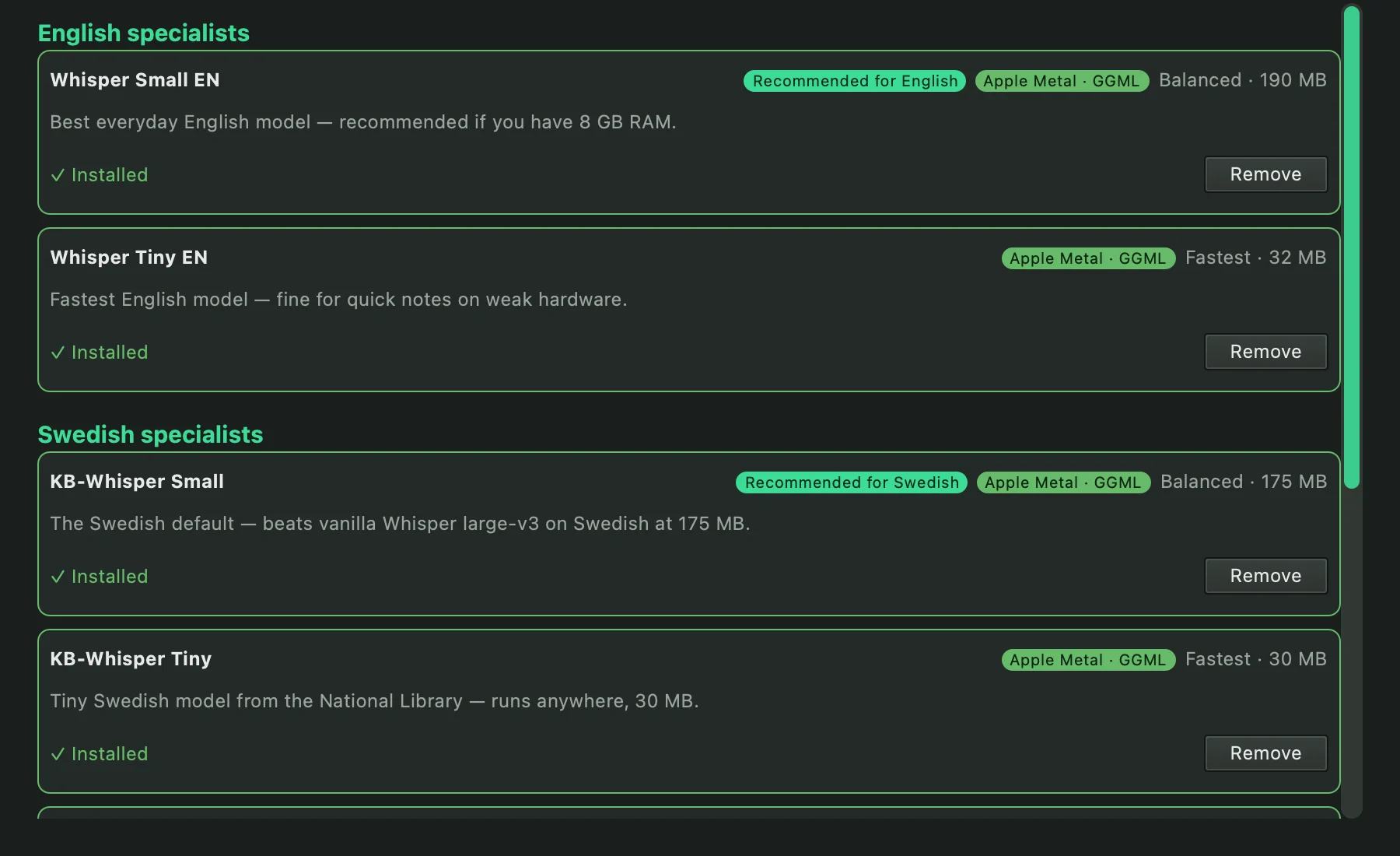
Pick a model by speed and accuracy, from 30 MB to large multilingual Whisper. Swedish uses KB-Whisper from the National Library of Sweden.
Apple Silicon uses Metal. Compatible AMD and Intel graphics use Vulkan on Linux, and NVIDIA cards use CUDA. Long dictations are split at natural pauses, so the seams do not add stray words.
One graphics card. Every device.
One computer with a strong graphics card does the transcribing for your other devices, privately over your own network: Viska in host mode (Värdläge – dela GPU, off until you switch it on), or Viska Server on an Ubuntu machine.
GPU · 1.5 GB budget
KB-Whisper medium · Swedish
Memory
Swedish stays loaded and answers at once.
Turn on host mode
On the computer with the GPU, open Settings and choose Host mode. Pick a Whisper model for each language, for example KB-Whisper for Swedish and a Whisper model for English. Viska suggests models that fit your graphics card and downloads what is missing.
Publish it privately
The host itself only listens on localhost. One click runs tailscale serve, which makes it reachable from your own tailnet over HTTPS and nowhere else.
Pair a device
Show a QR code or copy a pairing link. It carries the host address and a bearer token, and it is a secret: treat it like a password. Renew the token if a device is lost.
Who can use the host
Another computer. Choose the engine “Remote GPU (Viska host)” (Fjärr-GPU) and paste the pairing link, for example a Mac (Apple Silicon), a Windows 11 x64 PC or a Linux laptop without a big GPU. If the host cannot be reached, Viska falls back to the model on that computer.
An Android phone.Viska Voice is a voice keyboard that sends your speech to the host and types the text into the app you are in.
The host can also run without a window (viska --host) or as a background service.
What stays private
Nothing goes to the cloud. Audio travels only between your own devices over Tailscale.
Every request except a health check needs the bearer token, which the host keeps in the system keyring. The host does not log audio, text or the token.
Models are loaded when they are needed and unloaded after 20 idle minutes by default, so the GPU is free again when nobody is dictating. Dictation on the host computer itself always goes first.
Proofreading through the host is optional and uses the host’s own provider and settings.
No desktop on the GPU machine? Viska Server runs the same host as a standalone service for Ubuntu, with a one-line install. Host mode and the Remote GPU client are in Viska 0.7.6 for Linux and macOS and Viska 0.7.6 for Windows. How fast it is depends on your GPU and the model you choose; we publish no benchmark for it. Linux setup notes
Download Viska.
Free, no account. Linux and macOS are at version 0.7.6, and Windows is at 0.7.6. All three include host mode and the Remote GPU client. The Mac app is signed by Aeon Media Group AB and notarised by Apple. The Windows and Linux builds are not signed yet, so Windows asks you to confirm the first launch; the guides walk you through it.
macOS
Apple Silicon (M1 and later). Open the disk image and drag Viska to Applications. Grant Input Monitoring for the gestures.
Signed with a Developer ID and notarised by Apple, so it opens without a warning and should keep its permissions when you update. Intel Macs are not supported.
Windows
Windows 11 on Intel or AMD (x64). Installs for your user account, no administrator rights needed. Experimental preview.
Unsigned: SmartScreen may warn. Assembled from four parts and checked in your browser before saving. Microphone and paste still need more real-desktop testing; Windows on ARM is untested.
Debian & Ubuntu
x86_64 Debian 12+, Ubuntu 24.04+ and derivatives, including Kubuntu. Includes Vulkan acceleration for compatible AMD graphics and optional NVIDIA CUDA.
Desktop integration on Hyprland is still experimental.
All checksums: SHA256SUMS. Tested most on KDE Plasma; GNOME 48+ uses the same desktop portal. Other Linux distributions: Flatpak is planned.
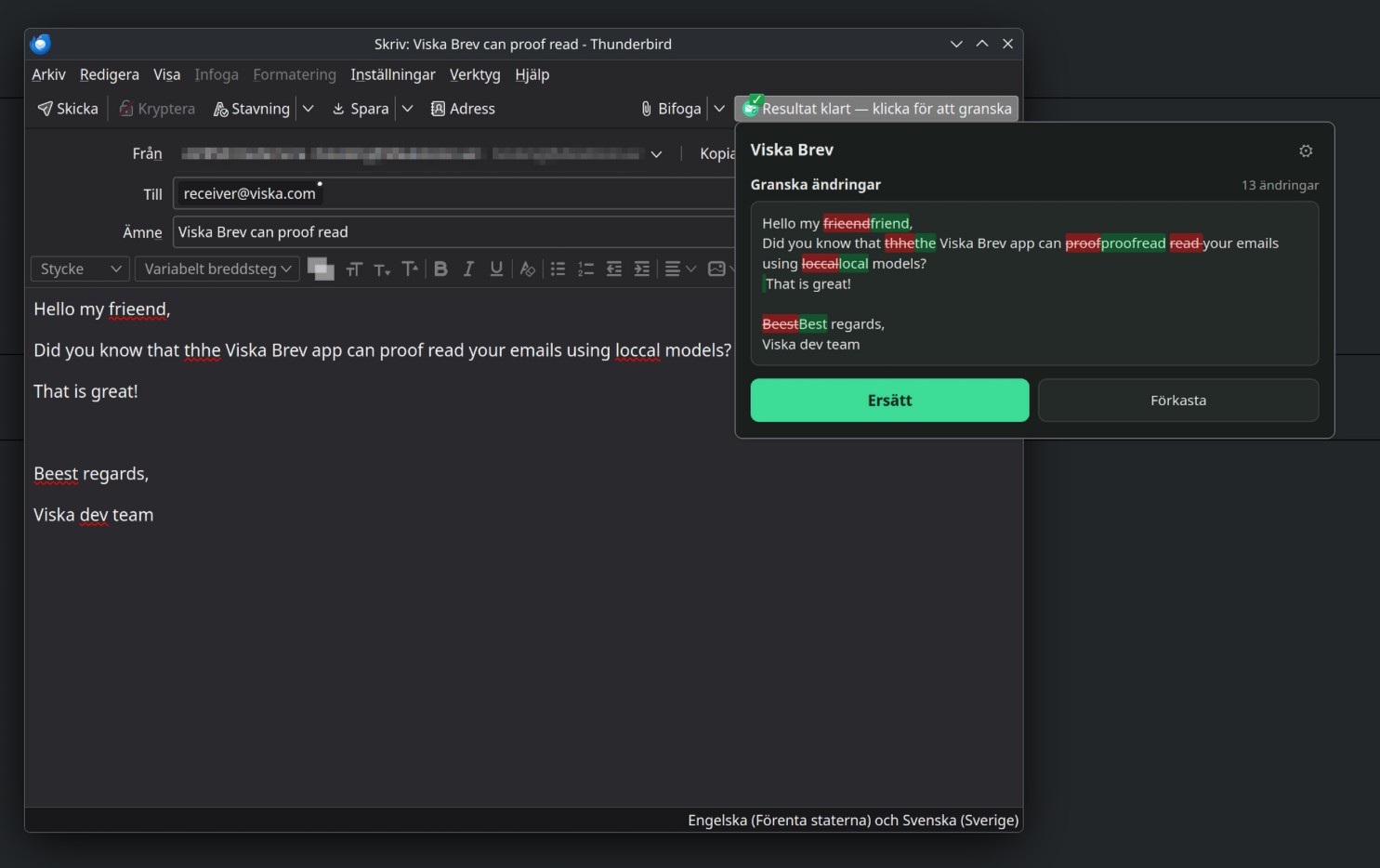
Viska Brev proofreads your email before you send it.
A Thunderbird extension for Swedish and English drafts. Check spelling, grammar or expand a rough draft, review the changes as a diff, and keep quotes and signatures untouched. Runs through your own Ollama server or Ollama Cloud, OpenRouter or an SGLang server.
A voice input method for your phone that sends speech over Tailscale to your own computer running Viska 0.7.6 in host mode, and types the transcript into the field you are in. Works with a keyboard that has a voice key, such as FUTO Keyboard. No cloud service, no account, no telemetry. Free software (GPL-3.0-or-later).
The Viska host as a standalone service for Ubuntu and Debian: a one-line install, any Whisper model per language, a memory budget that keeps your main language loaded, signed automatic updates, and Tailscale or public HTTPS. For a home server or a virtual machine with an NVIDIA card.
Viska 0.7.6 for macOS, Windows, Debian/Ubuntu and Arch/Omarchy. With a Remote GPU, the Models window lists the languages the host serves that are not in your language rotation yet, and adds them with one click. The "In language rotation" box follows the selected language again, and the window explains that the host chooses the model for each language.
0.7.5 for Linux
Viska 0.7.5 for Debian/Ubuntu and Arch/Omarchy: double-tap Ctrl starts dictation again on KDE Plasma. Since 0.7.3 the desktop's shortcut portal took over and the double-tap gesture never started; it now runs beside the portal. The Debian package also installs the compiler the gesture needs, so it works on a fresh Kubuntu 26.04. macOS and Windows stay at 0.7.4.
0.7.4 and Viska Server 0.2.1
Viska 0.7.4 for macOS, Windows, Debian/Ubuntu and Arch/Omarchy. With a Remote GPU, the language button, the tray and the language shortcut offer every language the Viska host or Viska Server serves, even when this computer has no model for it. A language added on the server appears within two minutes, without a restart.
Questions.
Does Viska work offline?
Yes. Once a speech model is downloaded, dictation runs entirely on your computer with no internet connection. Cloud engines and cloud proofreading are optional and only used when you choose them.
Does my voice leave my computer?
Not by default. Viska transcribes on your own computer and keeps audio in memory. Your voice leaves the computer only if you choose it. With host mode, audio goes only to your own host over your private Tailscale network. If you pick a cloud speech engine such as Groq or OpenAI, it goes to that provider. Cloud proofreading, if you turn it on, sends the transcribed text, not the audio.
Is it really free?
Yes. Viska is open source under the GPL-3.0 licence: no account, no subscription, no word limit. If you add a cloud provider, that provider bills you directly for what you use, and the app can track the estimated cost.
Is Viska a private alternative to Wispr Flow?
For dictation on a computer, yes. Both type where your cursor is. Wispr Flow transcribes in the cloud, and its documentation says data is processed and stored in the United States; Viska transcribes on your own machine by default, is free and open source, needs no account, and can share your own GPU with your laptop and Android phone over Tailscale. Wispr Flow has iPhone and Android apps, more than 100 languages and a personal dictionary that learns names; Viska runs on Linux too. Read the full comparison.
Can I use Viska for voice typing in ChatGPT, Claude or my code editor?
Yes. Viska types into whatever app has the cursor, so it works for AI prompts in ChatGPT, Claude or Gemini, for email and chat, for documents and for code editors and terminals. In a terminal, paste with CtrlShiftV if typing is blocked.
Which speech recognition does Viska use?
OpenAI’s open Whisper models, run locally through whisper.cpp or faster-whisper, and KB-Whisper from the National Library of Sweden for Swedish. You can also plug in cloud engines such as Groq, Deepgram or ElevenLabs with your own key.
How accurate is it?
Viska uses OpenAI’s Whisper models and, for Swedish, KB-Whisper. Larger models are more accurate and slower; the Models window labels each one by speed and size so you can choose for your computer. Proofreading can then fix what was misheard.
Why does Windows warn me when I open the installer?
The Windows preview is not yet signed with a Microsoft code-signing certificate, so SmartScreen asks you to confirm. The Windows guide shows how to do that safely, and every download has a SHA-256 checksum you can verify. The Mac app is signed and notarised by Apple and opens normally; see the macOS guide for the permissions it needs.
Can I dictate on my phone?
On Android, yes, with Viska Voice: a voice keyboard that sends your speech over Tailscale to your own computer running Viska in host mode. There is no iPhone app, and nothing is transcribed by a cloud service.
Can one computer with a GPU serve my other devices?
Yes. Run Viska 0.7.6 in host mode, publish it with Tailscale, and pair your other computers or your Android phone. How host mode works.
Does it work on Wayland?
Yes. On KDE Plasma and GNOME 48+ the global shortcuts use the XDG GlobalShortcuts portal; Hyprland uses xdg-desktop-portal-hyprland. On older desktops, bind a system shortcut to viska --toggle.